
Every Intel processor name is a compressed spec sheet. Once you learn the code, you can judge a chip before reading a single review.
This guide decodes every letter and number — from Core 3 100U to Core i9-13900K.
Anatomy of an Intel Processor Name
Each part of the model number tells you something specific. Here’s how to read it:
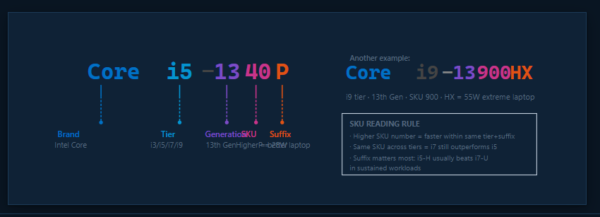
Key rule: Two processors with the same generation and SKU but different suffixes are completely different products.
A Core i7-1360P (28W) and a Core i7-1370H (45W) are miles apart in sustained performance.
Intel Dropped the “i” — The 2023 Rebrand
⚠ Old and new names coexist in stores right now
Starting late 2023, Intel retired “i3/i5/i7/i9” for mainstream chips. The new brand: Core 3/5/7 for everyday use,
Core Ultra 5/7/9 for premium AI-accelerated chips with a dedicated NPU. Same underlying Raptor Lake silicon — different badge on the box.
| Old Name | New Name (2023+) | Premium Tier | Segment |
|---|---|---|---|
Core i3 |
Core 3 |
— | Entry / budget |
Core i5 |
Core 5 |
Core Ultra 5 |
Mainstream |
Core i7 |
Core 7 |
Core Ultra 7 |
Performance |
Core i9 |
Core 9 |
Core Ultra 9 |
Enthusiast |
Core Ultra chips (Meteor Lake / Arrow Lake / Lunar Lake) add a dedicated NPU for AI — up to 48 TOPS.
Mainstream Core 3/5/7 chips do not have an NPU.
The Suffix Letter — The Most Important Part of the Name
The suffix is often more important than the tier (i3 vs i5). An i5-H will outperform an i7-U in sustained tasks because it has 3× the power budget.
Sustained Performance ↔ Battery Life
Higher sustained performance →
P-Cores vs E-Cores: Intel’s Hybrid Architecture (12th Gen+)
Since 12th gen (Alder Lake, 2021), Intel chips use two types of cores on the same die:
P-Core (Performance)
- Hyper-Threading: 2 threads per core
- High clock speed (up to 5.8 GHz on K-series)
- Games, browser, UI rendering, single-threaded tasks
- Consumes more power per core
E-Core (Efficiency)
- No Hyper-Threading: 1 thread per core
- Lower clock (up to ~4.0 GHz)
- Background tasks, antivirus scans, video decode
- Much lower power — better battery life
The Thread Director (hardware scheduler) automatically routes tasks to the right core type — you don’t need to configure anything.
Core Layouts by Variant
U-series
Core 3 100U
6 cores · 8 threads · 15W
U-series
Core i5-1335U / Core 5 120U
10 cores · 12 threads · 15W
P-series
Core i7-1360P
12 cores · 16 threads · 28W
H-series
Core i7-13700H
14 cores · 20 threads · 45W
HX-series
Core i9-13900HX
24 cores · 32 threads · 55W+
K-series
Core i9-13900K Desktop
24 cores · 32 threads · 125W
P-core (2 threads each)
E-core (1 thread each)
13th Gen Intel Core — Full Specification Comparison
All major 13th gen (Raptor Lake) configurations side by side. 12th gen has slightly lower clock speeds but otherwise similar structure.
| Model | Suffix | Cores (P+E) | Threads | Boost Clock | Base TDP | Max Turbo | Cache | iGPU |
|---|---|---|---|---|---|---|---|---|
| Core 3 100U | U | 2P + 4E | 8 | 4.7 GHz | 9 W | 55 W | 10 MB | Iris Xe 64EU |
| Core i3-1315U | U | 2P + 4E | 8 | 4.5 GHz | 15 W | 55 W | 10 MB | UHD 64EU |
| Core i5-1335U | U | 2P + 8E | 12 | 4.6 GHz | 15 W | 55 W | 12 MB | Iris Xe 80EU |
| Core i7-1365U | U | 2P + 8E | 12 | 5.2 GHz | 15 W | 55 W | 12 MB | Iris Xe 96EU |
| Core i5-1340P | P | 4P + 8E | 16 | 4.6 GHz | 28 W | 64 W | 12 MB | Iris Xe 80EU |
| Core i7-1360P | P | 4P + 8E | 16 | 5.0 GHz | 28 W | 64 W | 18 MB | Iris Xe 96EU |
| Core i5-13500H | H | 4P + 8E | 16 | 4.7 GHz | 45 W | 115 W | 18 MB | Iris Xe 80EU |
| Core i7-13700H | H | 6P + 8E | 20 | 5.0 GHz | 45 W | 115 W | 24 MB | Iris Xe 96EU |
| Core i9-13900H | H | 6P + 8E | 20 | 5.4 GHz | 45 W | 115 W | 24 MB | Iris Xe 96EU |
| Core i9-13900HX | HX | 8P + 16E | 32 | 5.4 GHz | 55 W | 157 W | 36 MB | UHD 32EU |
| Core i5-13600K | K | 6P + 8E | 20 | 5.1 GHz | 125 W | 181 W | 24 MB | UHD 770 |
| Core i7-13700K | K | 8P + 8E | 24 | 5.4 GHz | 125 W | 253 W | 30 MB | UHD 770 |
| Core i9-13900K | K | 8P + 16E | 32 | 5.8 GHz | 125 W | 253 W | 36 MB | UHD 770 |
* Base TDP is the configurable floor. Actual sustained performance varies by laptop cooling design — the same chip behaves very differently in a thin chassis versus a properly cooled one.
Deep Dive: Intel Core 3 100U (The Budget Laptop Chip)
The Core 3 100U — Intel’s new name for what used to be called the i3-U — is the most common chip in affordable thin-and-light laptops priced ₹30,000–₹55,000 in India.
Hardware Specs
Power & Memory
Real-World Workload Assessment
🌐 Web & Office
30+ browser tabs, Office suite, Teams calls, light photo editing — handles all of this effortlessly. This is where U chips shine.
💻 Coding / Dev
VS Code, Python/Node dev servers, Docker (light) — comfortable. Large builds (Android, Chromium) will take 2–4× longer than an H-series.
🎬 Video Editing
4K playback & light timeline edits: possible but sluggish. 1080p export is borderline. Not recommended for regular video work.
🎮 Gaming
Iris Xe 64EU: casual 2D games, Minecraft, CS:GO (low), GTA V (720p low) — playable. No modern AAA gaming at any meaningful settings.
🔋 Battery Life
9W base TDP = 10–14 hrs on a 50Wh battery for light use. One of the most efficient x86 laptop chips available.
🌡 Thermal Throttling
Bursts to 55W for ~30 sec, then drops to 12–18W in thin chassis. Heavy tasks will be noticeably slower in cheap plastic-build laptops.
Can These Chips Run Local LLMs?
The faster your RAM, the more tokens/second you get. This is why a U-series chip with LPDDR5-4800 can sometimes outperform a desktop chip running slow DDR4.
Estimated CPU Inference Speed — Core 3 100U (16GB LPDDR5, Q4_K_M quantisation, llama.cpp)
3.8B · ~2.3 GB
3B · ~2 GB
7B · ~4.7 GB
8B · ~5 GB
13B · ~8 GB
70B · ~42 GB
* Estimates based on LPDDR5-4800 dual-channel (~65 GB/s effective). Results vary by cooling and RAM config. Speeds below ~5 tok/s feel noticeably slow for real-time chat.
LLM Capability by CPU Suffix
🔵 U-series (9–15W)
Best for: 3B–7B models at Q4.
Phi-3 Mini, Gemma 2B, Llama 3.2 3B run at ~8–12 tok/s.
7B models work but feel slow (~3–5 tok/s).
Minimum 16GB RAM; 32GB unlocks 13B at very slow speed.
🔷 P-series (28W)
Best for: 7B–13B at Q4.
Higher sustained TDP = higher sustained memory bandwidth.
7B chat is comfortable (~5–8 tok/s).
13B with 32GB is borderline usable (~3–5 tok/s).
🟣 H-series (45W)
Best for: 13B–30B at Q4.
With 32GB+ DDR5: Llama 13B is comfortable (~6–10 tok/s).
Llama 34B works with 32GB at acceptable speed.
Recommended minimum for daily LLM use.
🔴 K-series Desktop (125W)
Best for: 30B–70B at Q4 (64GB RAM).
DDR5-6000 dual channel: ~96 GB/s bandwidth.
70B at Q4 fits in 64GB, runs ~2–4 tok/s.
Full LLM workstation capability in CPU-only mode.
iGPU Offload tip: llama.cpp supports offloading model layers to the Intel Iris Xe iGPU via OpenCL/SYCL.
On a Core 3 100U with shared LPDDR5 memory, this gives a ~10–20% speed boost on small models. Use -ngl 20 in llama.cpp.
Core Ultra NPU: If you have a Core Ultra chip (Meteor Lake or newer), the dedicated NPU (11–48 TOPS) can accelerate
Phi-3 Mini and small models via OpenVINO. This is where the “Ultra” premium starts to pay off for AI work.
RAM Requirement by Model Size
| Model Size | Q4_K_M Size | Min RAM | Recommended | Suitable CPU |
|---|---|---|---|---|
| ~1–3B (Phi, Gemma) | ~1–2 GB | 8 GB | 16 GB | Any U-series or older chip |
| 7B (Mistral, Llama 7B) | ~4.7 GB | 8 GB | 16 GB | U-series (slow), P/H (usable) |
| 13B (Llama 13B) | ~8 GB | 16 GB | 32 GB | H-series minimum for usable speed |
| 34B (CodeLlama 34B) | ~22 GB | 32 GB | 48 GB | H/HX laptop, K desktop |
| 70B (Llama 70B) | ~42 GB | 48 GB | 64 GB | Desktop K-series (64GB DDR5) only |
Which Variant Should You Buy?
U
Avoid if: you compile large projects daily, edit video regularly, or want to run 7B+ LLMs comfortably.
P
The underrated sweet spot — better than U under load without the weight penalty of H.
H
H-series with a discrete GPU (RTX 4060+) is the best all-rounder for LLM + gaming right now.
HX
K
The i5-13600K is arguably the best price/performance desktop CPU — handles 70B LLM on 64GB DDR5.
Intel Core, Iris Xe and related names are trademarks of Intel Corporation. Specifications sourced from Intel ARK and product documentation.
Performance estimates are based on community benchmarks and will vary by laptop cooling, memory configuration, and specific workload.
